
Animated Shapes & Arrows
Draw attention with animated arrows and shapes.
Show viewers exactly where to look. Hand-drawn arrows, circles, checkmarks and crosses draw themselves onto your video, making a small detail or the next tutorial step easier to follow.
Try it in ShortsJet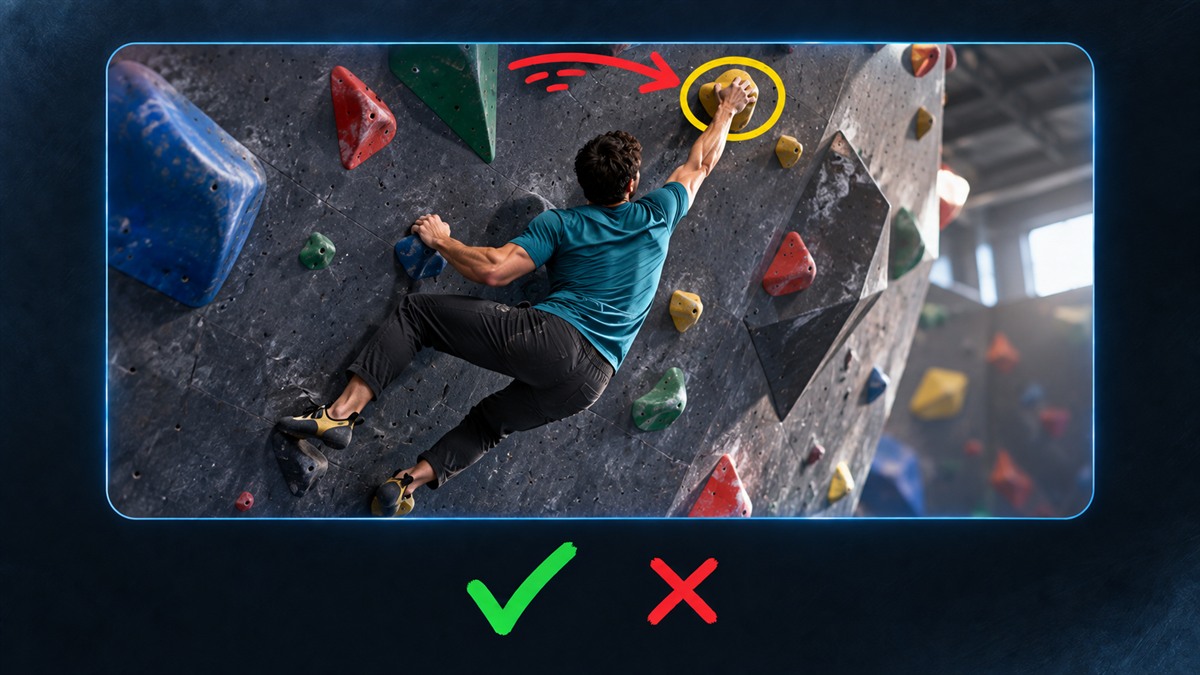
- Five hand-drawn shapes
- Adjustable drawing speed
- Optional pointing motion
Turn a detail into the focus of your video
A hand placement in a climbing tutorial, a software button or a detail in a craft demonstration can be easy to miss. Place a straight or curved arrow beside it, or use a scribble circle to frame the area. The stroke appears progressively, like a mark being drawn with a pen.
Use a green checkmark to confirm a completed step or a red cross to flag a common mistake. These are editable shape clips, so you can place them over footage, screenshots or a freeze frame and decide how long each stays visible.
Make the stroke fit your edit
Open Overlays → Hand Drawn and choose Arrow, Curved arrow, Scribble circle, Checkmark or Cross. Position, resize and rotate the shape in the preview. Change its stroke colour and width in Properties to keep the mark readable against your footage.
Draw time controls how quickly the stroke appears. Once it is complete, the mark stays visible until its clip ends. Extend the clip for a longer explanation, or shorten it for a quick visual cue. The irregular curves keep their shape throughout playback.
Time the movement to your explanation
Arrows offer optional Pointing motion: a gentle repeated movement towards the tip after the drawing finishes. Use it when a control or detail needs a little extra emphasis. Circles, checkmarks and crosses stay in place once drawn.
Preview drawing plays the animation from the start of the shape clip. Move the clip to line it up with your voiceover and check the result with the surrounding edit. Drawing settings are saved in the project, support undo and redo, and appear in the exported video. No separate animation file is needed.
A CLOSER LOOK
Good to know.
Do I need to draw or import the animation myself?
No. The five hand-drawn shapes are built into ShortsJet. Choose a shape and customise its appearance and timing directly in the editor.
Can I keep an arrow visible after it finishes drawing?
Yes. The completed shape stays visible until its clip ends. Extend the clip to keep it on screen longer; Draw time only controls the drawing animation.
Can I put animated callouts over a screenshot?
Yes. Put the screenshot on a visual layer and place the shape on a layer above it. You can also combine the marks with video, captions and voiceover.
Try it with your next video.
ShortsJet for Windows and Ubuntu Linux. Free for 30 days.